

On-site Geofence
On-site Geofence
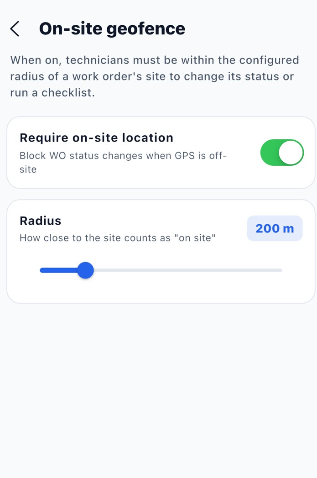
The Geofence settings allow administrators to restrict work order actions to technicians who are physically within the configured site location.
| Section / Option | Description |
|---|---|
| On-site geofence | Controls whether work order actions are restricted based on the technician's location. |
| Require on-site location | When enabled, mobile users must be within the configured site radius to perform certain work order actions and checklist execution. |
| Enable / Disable | Turns the on-site location restriction on or off. |
| Radius | Defines how close the technician must be to the work order's site to be considered on-site. |
| Current | Displays the currently configured geofence radius. |
| Radius Range | The radius can be configured between 20 m and 1000 m. |
Geofence Workflow
Open Settings
      ↓
Select Geofence
      ↓
Enable Require on-site location
      ↓
Set Required Radius
      ↓
Save / Apply Settings
      ↓
Technician Performs Work Order Action
      ↓
System Checks Technician Location
      ↓
Within Configured Radius → Action Allowed
      ↓
Outside Configured Radius → Action Restricted